Showing posts with label Autodesk Labs. Show all posts

Wednesday, September 7, 2016

Fired up over Hydrants


Hydrants are a feature people have been wanting since pressure pipes were added to Civil 3D, but have you ever tried to place one in your drawing? Where are the darn hydrants? There is a Hydrant category under the PVC parts list, but you have to manipulate the settings, like all the great functions in C3D, in order to find it. Here’s how we “put out the fire”, and added the Hydrant to our parts list.

Start with setting your ‘Pressure Network Catalog’ to PVC. To do this, from the Home tab, click the drop down next to ‘Create Design’. The tool on the lower left of this pull down will allow you to change what parts catalog you are using. Select PVC.


Return to the Home tab and click on ‘Pipe Network’, select ‘Pressure Network Creation Tools’. When the ‘Create Pressure Pipe Network’ dialog box pops up, under ‘Parts List’, select the drop down next to ‘Edit Current Selection’, and select ‘Create New’.


This prompts the ‘Pressure Network Parts List’ – “New Part List” function to appear.  Name your parts list. If you have ample time you can opt to choose your materials, select what pipes, fittings, and appurtenances you want to use. If not, just simply give the new list a name allowing you to move on to actually locating the elusive Hydrant… 

Right click on your newly created parts list and click on ‘Add type.’  At the bottom of the list is the Hydrant – click on the plus sign to expand the Hydrant category and select the Hydrant by clicking the box to the left. Click ok to save.


Click on the box next to ‘Hydrant_MJ’.
  
Don’t stop here – you still have to select the size of Hydrant. We weren’t joking when we called it elusive.  Expand your “New Parts List” and right click on Hydrant_MJ. Select ‘Add size’ and select the  ‘Add all sizes’ option, as shown below.
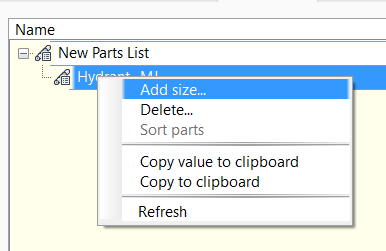


To add a hydrant to your design, draw your pipe network, select the hydrant on the dropdown for appurtenances, and click on ‘Add Appurtenance’. You can now click on your pipe network and add in a hydrant where you need one.


With that, you can now add fire hydrants to your drawing! Check out the video below to see all of the steps described, and others available at ADSK Solutions. For further training and questions, please email info@ADSKsolutions.com.

-Tyler McMillin, E.I.T.


Monday, December 12, 2011

Vertical road alignments designed by the CLOUD

Wow! What is coming next? I uploaded the existing ground profile to the Cloud and it came back with the the road completly designed and a report was included. If I send a dollar to the CLOUD I wonder if it would send $100 back?

Ok, the truth is, it does send back a vertical alignment and it is optimized to meet minimum, maximum grade and pvi matching can be set.

Install the software from Autodesk Labs. Project Silverstar for AutoCAD Civil 3D This software will be located in the Toolspace under the Toolbox. Profile Optimization. Login to subscription and create a login into the Autodesk Cloud.


Right click to start this new utility. Login to the Autodesk Cloud (Existing ground profile is required) **Make sure a design speed is provided.


Set minimum and maximum grades, toggle matching PVI's.


Set PVI intensity, and notice
Maximum Solving Time.


BAM! The Cloud has received the data. All we have to do is wait for the return email. I planned on posting the results so I set the maximum time to 1 minute. Unfortunately it has been 1/2 hour and I have not received an email. Going to bed and will post the results tomorrow.

The results were returned from the cloud in about 1.5 hours. I have posted the Report, XML, and the ASCII file on the Autodesk CLOUD. Did you expect anything else? It only takes a second to view or download.
PDF report - https://documents.cloud.autodesk.com/Public/Details?hash=tYUTSWt
XML file - https://documents.cloud.autodesk.com/Public/Details?hash=tYUTdbM
ASCII file - https://documents.cloud.autodesk.com/Public/Details?hash=tYUTNX2

I believe this utility has a lot of potential. I would like it to ask for all PVI elevations that I have to match. Main roads, secondary roads etc. This utility is very similar to the best fit profile utility with a couple more options. Given the time it takes to return the design I believe this is more of a introduction to the Cloud then a program I can utilize at this time. Below are the steps to create a Best Fit Design Profile.
*See image below for best fit profile utility.

The team at Autodesk Labs is very responsive to all feedback. I cannot encourage you enough to share your expectations or obstacles. Below is the feedback that was returned to me.

Dear Mr. Studer,


Thank you for the valuable feedback. If you do not mind, I would be happy to discuss Project Silverstar further with you, in order to get more feedback?

First about the delay. I quickly looked at the log files on the cloud. Unfortunately, your job with the short solving time was just queued up behind some longer jobs. This is why you didn’t receive an answer quickly. We are working on improving our load-balancing to avoid such situations in the future as best as possible.

(I suggested the ability to add more PVI's)
Adding more PVI is a feature that we actually thought about already. I don’t think it would be a major problem to add this on the cloud side. On the client side (wizard), how would you, from a user perspective, best like to enter the PVI information? Would a list similar to the one for borrow/waste pits be a solution? One problem with such a list is that a user could potentially enter PVI’s that will conflict with other design constraints (minimum tangent length, grade constraints, etc.). Designing a user interface that takes that into account without confusing the user would be nice, but can be tricky. If you have any ideas or suggestions in this respect, please let me know.

As for the similarities with the best fit utility, SilverStar works actually quite different. The Best Fit utility tries to find a profile that fits the ground as close as possible. This can be computed very fast. SilverStar, on the other hand, tries to find a profile that minimizes total earthwork costs (cut, fill, load, and especially hauling), subject to a set of design constraints. From a computational perspective, this is a hard problem which requires significantly more computation time than Best Fit. This is one of the reason that the SilverStar algorithm is in the Cloud.

I hope this explains some of the issues. I am looking forward to get more feedback from you in order to get SilverStar more usable.

Thank you very much,
Valentin Koch
Principal Research Engineer
AEC IM
Autodesk Inc.

Sunday, December 11, 2011

Civil 3D 2013 Preview and FREE 2012

The beta has been released for Civil 3D 2013, but before I look at it, I would like everyone to know that a $#!^ ton of add on programs are currently available for Civil 3D 2012. History has shown subscription users can learn features before they are released into the up coming version.

Another cool place to utilize cutting edge technology is Autodesk Labs. Part of my job involves keeping up with the latest software. Sounds easy, and is if thats all you have to do. To help everyone out I am posting software available for Civil 3D 2012. All of the software below is FREE.
**Autodesk subscriptions does require subscription.
Autodesk Civil 3D 2012 Subscription Downloads
• Volumes Dashboard Extension for AutoCAD Civil 3D 2012 (extension)
• 12d Data Extension for AutoCAD Civil 3D 2012
• AutoCAD Civil 3D 2012 Import/Export Extension for GENIO
• Bid Express Extension for AutoCAD Civil 3D 2012
• Autodesk Subassembly Composer for AutoCAD Civil 3D 2011 & 2012

Autodesk Labs
Bridge Modeler for AutoCAD Civil 3D
Corridor Solids for AutoCAD Civil 3D
Point Cloud Feature Extraction for AutoCAD Civil 3D
Project Silverstar for AutoCAD Civil 3D (utilizes the cloud)
River Analysis Extension for AutoCAD Civil 3D / AutoCAD Map 3D

Recommended and Software I am Utilizing **Free for 30 days - let them you know you saw it here and recieve a discount
Steltman Software
Sincpac C3D


Autodesk Civil 3D 2012 Utilities and Drivers
AutoCAD Civil 3D 2012 DACH Extension

AutoCAD Plant 3D 2012 Object Enablers
CAiCE Translator Extension for AutoCAD Civil 3D 2012
AutoCAD Civil 3D 2012 Spanish Import Export Tools
Autodesk Subassembly Composer Support Pack for AutoCAD Civil 3D 2011 & 2012
AutoCAD Civil 3D 2012 Cartogramma Extension
AutoCAD Civil 3D 2012 Borehole 64bit
AutoCAD Civil 3D 2012 PISTE Extension
Open Light 2012 Object Enabler (32-bit and 64-bit)
AutoCAD Civil 3D 2012 Transportation Extension
AutoCAD Structural Detailing 2012 Object Enablers (32-bit and 64-bit)

Autodesk Civil 3D 2012 Updates and Service Packs
AutoCAD Civil 3D Update Update 1 - 2011-Dec-08
AutoCAD 2012 Performance Slowdown Hotfix (32/64 bit)
AutoCAD and AutoCAD LT 2012 SP1 Ribbon Hotfix
Hotfix - Prospector Lock-up
AutoCAD 2012 Block Editor Save Corruption Hot Fix
Autodesk Infrastructure Design Suite Network License Hotfix
Welcome Screen Hotfix (UK English Only)
Welcome Screen and Ranges of Analysis Types Hotfix (German and Japanese only)
Autodesk Storm and Sanitary Analysis 2012 Hotfix (localized Civil 3D and Map 3D versions Only)
Standards Audit Report Hotfix for French AutoCAD® 2012
Autodesk 2012 Content Explorer Service Hot Fix
Autodesk Material Library Medium Resolution Image Library 2012
Autodesk IPv4 Network License Manager for Windows
Civil 3D Object Based Security Removal - Server
Autodesk IPv6 Network License Manager for Windows
I plan to post detailed information, videos and reviews on all of the software over the holidays on my website. Sterling Systems, LLC All updates will be posted as they are released.

Please let me know if I missed any current downloads or if you would like to recommend Civil 3D enhancements.  Below is a preview of my Toolsbox as a result of the downloads listed above.